
You are using an out of date browser. It may not display this or other websites correctly.
You should upgrade or use an alternative browser.
You should upgrade or use an alternative browser.
Other d912pxy from GW2, now supports BnS!
- Thread starter Striking Shadow
- Start date
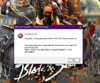
So absolutely no one can confirm if this is possible to be installed on win 8.1?
I think direc12 is exclusive to w10
you need to uninstall your visual c++ and re install it, in this forum some one make a tool to install all vc++ needed to play bnsAnyone knows how to fix this runtime error ? Already tried to fix in the ncsoft launcher
d912pxy v1.4 was released d912pxy v1.4
I'm currently at this step
- Wait until the area you currently are in have fully loaded, then quit the game (don't press "kill game" in bnsbuddy or crash it in any other way)

Better to read this one on installing https://github.com/megai2/d912pxy/wiki/Installing-for-Blade-&-Soul
Better to read this one on installing https://github.com/megai2/d912pxy/wiki/Installing-for-Blade-&-Soul
So i don't really need to follow this?
As someone wrote on bns academy discord, here are the steps to follow if you want to make it work:
Sidenotes
- Copy folder to 64bit client folder (same as Client.exe)
- Copy d912pxy/dll/release/d3d9.dll to same folder as Client.exe
- Start the game to generate config.ini (starting with bnsbuddy works fine)
- Close the game
- Edit config.ini to following values:
Code:allow_realtime_checks=1 occlusion=1clear=0 cpu_api_reduction=1 batch_commit=1 omrt_viewport_reset=1 draw_up_buffer_length=FFFFF enable_profiling=1- Delete all .pck files in d912pxy/pck/
- Start the game again and go ingame
- Wait until the area you currently are in have fully loaded, then quit the game (don't press "kill game" in bnsbuddy or crash it in any other way)
- Edit config.ini again to:
Code:enable_profiling=0- Delete all .pck-files EXCEPT shader_profiles.pck
- Start the game as you usually do. The first time you close the game after this you want to avoid the "kill game"-feature in bns buddy, but afterwards it's ok to kill/crash the game again
Hope this helps
- You WILL be bald first time you log in
- It is ok to get several runtime errors during the process. Check if it worked anyway or restart the game.
- If you get a black screen when pin is supposed to show up you should just wait and it'll come sooner or later á la NCSOFT (will only happen the first few times)
- First time you see a texture it will take som time to load (floor, walls, people etc.)
- You might want to change effects to low if you haven't already
- The longer I played the smoother it got
Thanks to Mejsle for the guide
That guide you quoted is outdated.
I see, thank you
My game freezes on loading screen, won't do anything unless I kill game via buddy or attempt to kill process in task manager. But it actually doesn't close, so I have to restart the Pc. Any idea? Specs are i5 4460, 16gb ddr and 1050 ti
Dunno, try latest revision, maybe will work https://ci.appveyor.com/project/megai2/d912pxy/build/artifactsMy game freezes on loading screen, won't do anything unless I kill game via buddy or attempt to kill process in task manager. But it actually doesn't close, so I have to restart the Pc. Any idea? Specs are i5 4460, 16gb ddr and 1050 ti
v1.6 is live https://github.com/megai2/d912pxy/releases
OMG thx

love the latest release.
140 fps with maxed graphics(with shadows on 5) on a amd r7 2700x (oc to 4.2) and amd r580(stock oc edition), 16gb (2x8) 3200mhz