
nope, visual bugs is a must cause this is just a beta and not official DX12 support from DevSome way to fix terrible effects?
nope, visual bugs is a must cause this is just a beta and not official DX12 support from DevSome way to fix terrible effects?

repair your game.Doesn't work for me. It crashes during the splash screen.
are you shure that win 7 support dx 12? I saw there ware only some selected gaes.That support win 10 and win 7 (Full update) , not support win 8 and 8.1 , if you use win 7( Not full update) and win 8 , win 8.1 can't use this. But you can use d9vk , but d9vk need driver card choose (D912pxy not need).
hmmmm i just got black screen,
I can see the bns mouse pointer, hear the sound and if I press the security keys (blindly), I can also hear the sound of it.
all overlays are closed.
My graphics card is a gtx970m
ah and i did it as Healiha wrote above
well, It's not so hard to follow these simple steps.
but i think i found out what i did wrong.
some time ago i followed an "performance" guide
where you had to delet the 2 BNS profiles with nvidia inspector.
i just reinstalled graphic driver and now it works ^^
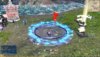
but is it normal that everything is so bright at first start ?
you are welcomeare you shure that win 7 support dx 12? I saw there ware only some selected gaes.
windows 7 don't have native support of dx12. Only for certain games. bns starts with error on win 7 with d912pxy.you are welcome
I will try with win 7 pro full update if this working i will make a video.windows 7 don't have native support of dx12. Only for certain games. bns starts with error on win 7 with d912pxy.