
I decided to make this tool to make dat editing easier — so you don’t need full BnS Buddy just for .dat work.
It still works the same overall idea as BnS Buddy, but you pick paths yourself.
2026 update: Dat handling now uses the same Pilao / bnscompression engine as BnSBuddy2.
AES keys, RSA signatures, 32/64-bit, compression, and BXML version are detected automatically from each .dat.
You no longer need to configure region keys, XOR, or era presets.
───

───
How to use (File Select + Editor)
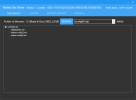
1. Open the FILE SELECT tab
2. Press BROWSE → choose the folder that contains your .dat files
3. Pick the .dat from the dropdown
4. Wait for the tree to load (status will show something like Loaded · AES=…; bitness shows as 32-bit / 64-bit)
5. Click a file in the tree (.xml / .x16 / .txt)
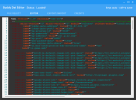
6. Edit in the EDITOR tab
7. Ctrl+S to save (writes the file and repacks the dat with the detected settings)
Done.
───
Export / Import (full unpack / repack)
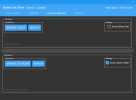
Same as before, on the EXPORT/IMPORT tab:
• Browse to dat → Unpack → gets yourfile.dat.files
• Edit files on disk if you want
• Browse to folder → Repack
Keys are still auto-detected; optional Auto Delete Dat / Auto Clean Folder still work.
───
Tips
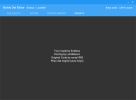
• Right-click the tab bar / use the context menu → Show detected settings to see AES, signature, BXML, compression, and 64-bit for the current dat
• First open of a large dat extracts to %TEMP%\<datname>\ (same idea as Buddy)
• Client *64.dat files (e.g. xml64.dat, config64.dat) are treated as 64-bit archives
───
Requirements
• 64-bit Windows (the app is x64; bnscompression.dll is x64-only)
• .NET Framework 4.7.1+
• Redistribute the whole package (DatEditor.exe + bnscompression.dll if present next to the exe)
───
What’s new (vs old Dat Editor)
┌──────────────────────────────────┬──────────────────────────────────────────────────────┐
│ Old │ Now │
├──────────────────────────────────┼──────────────────────────────────────────────────────┤
│ Keys & XOR tab / region radios │ Removed — not needed │
├──────────────────────────────────┼──────────────────────────────────────────────────────┤
│ Manual AES / XOR / 32–64 toggles │ Auto-detect on open / unpack / repack │
├──────────────────────────────────┼──────────────────────────────────────────────────────┤
│ DatEditingDll + Ionic.Zlib │ bnscompression only (Pilao engine) │
├──────────────────────────────────┼──────────────────────────────────────────────────────┤
│ Easy to pick the wrong key │ Wrong-key issues mostly gone for supported live dats │
└──────────────────────────────────┴──────────────────────────────────────────────────────┘
───
Notes / disclaimer
• Editing client data can break the game or violate the ToS of your region. You are responsible for what you do with this tool.
• Prefer repairing/restoring official files if something goes wrong.
• Private servers with custom keys may still fail if the key isn’t in the known set.
───
Download:
It still works the same overall idea as BnS Buddy, but you pick paths yourself.
2026 update: Dat handling now uses the same Pilao / bnscompression engine as BnSBuddy2.
AES keys, RSA signatures, 32/64-bit, compression, and BXML version are detected automatically from each .dat.
You no longer need to configure region keys, XOR, or era presets.
───
───
How to use (File Select + Editor)
1. Open the FILE SELECT tab
2. Press BROWSE → choose the folder that contains your .dat files
3. Pick the .dat from the dropdown
4. Wait for the tree to load (status will show something like Loaded · AES=…; bitness shows as 32-bit / 64-bit)
5. Click a file in the tree (.xml / .x16 / .txt)
6. Edit in the EDITOR tab
7. Ctrl+S to save (writes the file and repacks the dat with the detected settings)
Done.
───
Export / Import (full unpack / repack)
Same as before, on the EXPORT/IMPORT tab:
• Browse to dat → Unpack → gets yourfile.dat.files
• Edit files on disk if you want
• Browse to folder → Repack
Keys are still auto-detected; optional Auto Delete Dat / Auto Clean Folder still work.
───
Tips
• Right-click the tab bar / use the context menu → Show detected settings to see AES, signature, BXML, compression, and 64-bit for the current dat
• First open of a large dat extracts to %TEMP%\<datname>\ (same idea as Buddy)
• Client *64.dat files (e.g. xml64.dat, config64.dat) are treated as 64-bit archives
───
Requirements
• 64-bit Windows (the app is x64; bnscompression.dll is x64-only)
• .NET Framework 4.7.1+
• Redistribute the whole package (DatEditor.exe + bnscompression.dll if present next to the exe)
───
What’s new (vs old Dat Editor)
┌──────────────────────────────────┬──────────────────────────────────────────────────────┐
│ Old │ Now │
├──────────────────────────────────┼──────────────────────────────────────────────────────┤
│ Keys & XOR tab / region radios │ Removed — not needed │
├──────────────────────────────────┼──────────────────────────────────────────────────────┤
│ Manual AES / XOR / 32–64 toggles │ Auto-detect on open / unpack / repack │
├──────────────────────────────────┼──────────────────────────────────────────────────────┤
│ DatEditingDll + Ionic.Zlib │ bnscompression only (Pilao engine) │
├──────────────────────────────────┼──────────────────────────────────────────────────────┤
│ Easy to pick the wrong key │ Wrong-key issues mostly gone for supported live dats │
└──────────────────────────────────┴──────────────────────────────────────────────────────┘
───
Notes / disclaimer
• Editing client data can break the game or violate the ToS of your region. You are responsible for what you do with this tool.
• Prefer repairing/restoring official files if something goes wrong.
• Private servers with custom keys may still fail if the key isn’t in the known set.
───
Download:
You don't have permission to view content!
Last edited:
